
FLASHCARDS
Flashcards: learn, create, sell
Spaced-repetition flashcards with Markdown and LaTeX, built by hand or by an AI. Plus how to sell your decks in the marketplace.
How flashcards work
Create a deck
Open “Flashcards” from the app menu (top left) and click “New deck”. A deck groups any number of cards on one topic. Give it a title, language, tags and an optional price.
Front and back
Every card has a front (the question or task) and a back (the answer). While studying you see the front first and flip the card with a click or the space bar.
Markdown & LaTeX
Both sides understand Markdown (headings, lists, **bold**, `code`) and LaTeX: inline with single dollar signs $a^2+b^2=c^2$ and as a block with double dollar signs $$\int_0^1 x^2\,dx=\tfrac13$$. Everything renders cleanly while you study.
Spaced repetition
HUBRYOX schedules each card with a repetition algorithm: what you know well comes back less often, what’s hard comes back more. You retain more with minimal effort.
AI audio
On any study card you can have the front and back read aloud, handy on the go and for revising by ear.
Let an AI create your cards
You don’t have to type every card yourself. Ask an AI assistant (e.g. Claude or ChatGPT) for a whole set and paste the front and back straight into HUBRYOX. Copy the prompt below and swap in your topic:
You are a study coach. Turn the topic below into a set of flashcards for spaced-repetition learning.

Rules:
- Output every card as a pair: "Front" (a precise question or task) and "Back" (the full, clear answer).
- Format with Markdown: headings (##), lists (-), **bold**, `code`.
- Write math in LaTeX: inline with single dollar signs, e.g. $E=mc^2$; block formulas with double dollar signs, e.g. $$\int_0^1 x^2\,dx=\tfrac13$$.
- One card = one concept. Keep the front short, the back complete.
- Create 10–20 cards, ordered from easy to hard.

Topic: [PASTE YOUR TOPIC HERE]
Important: the prompt tells the AI to use Markdown and LaTeX, inline with $…$ and block with $$…$$, exactly how the cards render.
Then what?
Create a new deck in HUBRYOX, add one card per pair, and paste the “Front” into the front field and the “Back” into the back field. Markdown and LaTeX render automatically, with nothing else to do.
Flashcards in action
Click an image to enlarge.
Selling decks: set up Stripe Connect
You can offer your decks for a price in the marketplace. Before you sell anything (flashcard decks or articles and books in the Library) you must set up Stripe Connect once in your profile settings. Only then can you publish paid listings and receive payouts.
Creating, publishing and free sharing are free. To sell paid decks or Library content via Stripe, you set up Stripe Connect once, which requires a Starter plan or higher.
Four steps to payouts
- 1
Open profile settings
In your profile settings, go to the “Payouts” tab.
- 2
Start Stripe Connect
Click “Connect” / “Stripe Dashboard” and follow Stripe’s onboarding (identity, bank account, tax details).
- 3
Pick a default currency
Set your default currency: it pre-fills the price on new decks and Library listings and is overridable per listing.
- 4
Connected: sell
Once it shows “Connected” you can publish priced decks and Library content. Payouts run automatically via Stripe.
You’ll find it all under: Profile → Settings → Payouts → Stripe Connect.
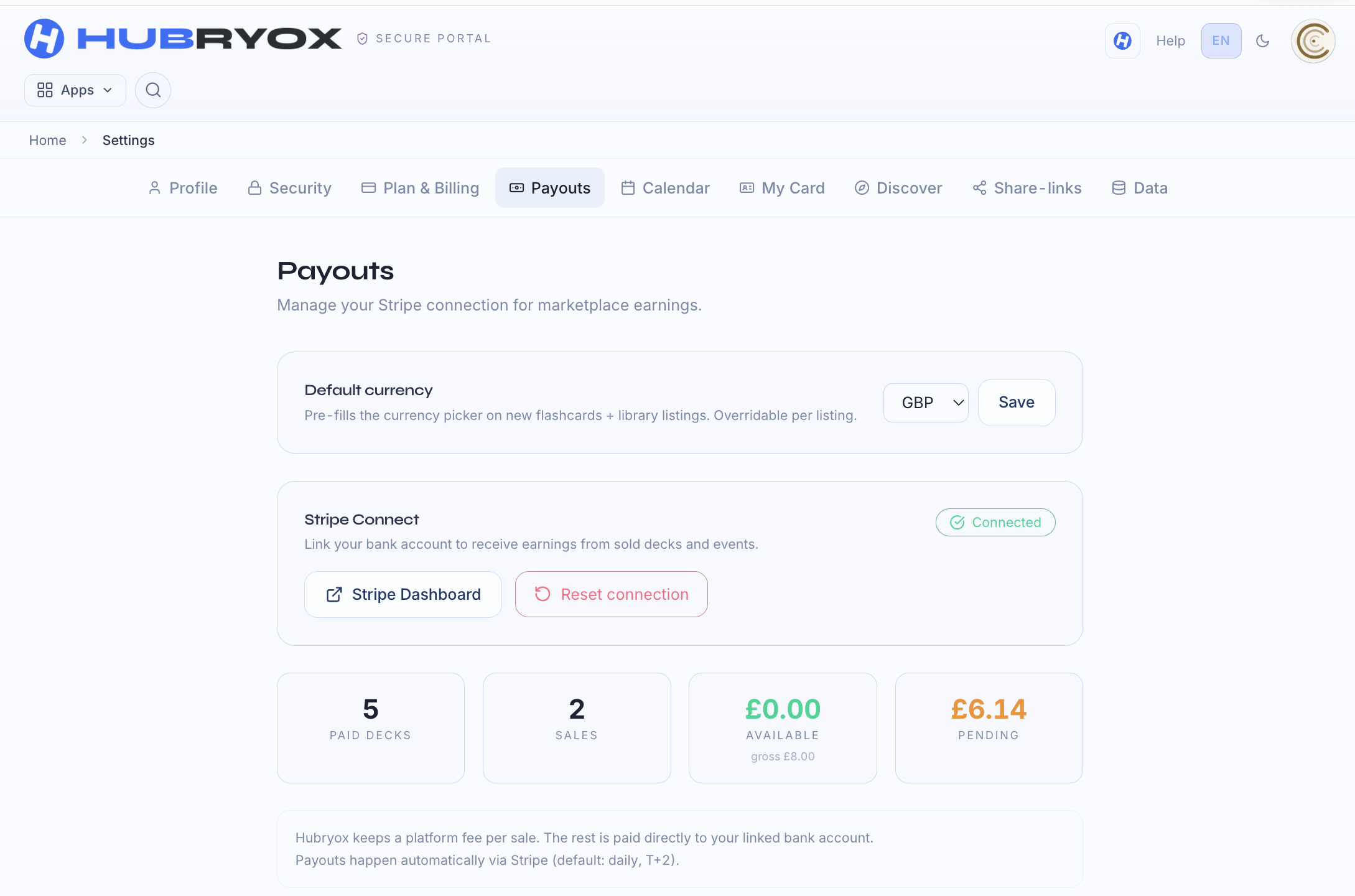
The default currency is overridable per listing: set it to match your main audience.
HUBRYOX keeps a 10% platform fee per sale; we cover the Stripe payment fees out of our share. Payouts go automatically straight to your bank account.
Pay securely with Stripe
Payments and payouts run entirely through Stripe, a globally established, PCI-DSS-certified payment provider trusted by leading companies. HUBRYOX never sees or stores card details; your bank account stays securely with Stripe. Purchases stay protected for your customers and payouts for you.
Ready to learn and earn with flashcards?
Create your first deck or learn more about Learn & Earn.